












What Is Contract Signing?
Contract signing is the stage in the contract lifecycle when parties formally indicate their agreement to the negotiated terms and conditions. A signed agreement serves as evidence of parties’ agreement and may provide a basis for legal remedies if a party breaches its obligations. By signing, the parties generally acknowledge that they have read and understood the agreement, accepted its terms, and have the authority and capacity to enter into it.
Why Is Signing an Agreement Important?
A signed agreement is crucial, especially for businesses, for three key reasons:
- It establishes mutual agreement. A written contract sets out the parties' responsibilities and provides clear specifications for how they are expected to act.
- It helps prevent misunderstandings. Documenting the agreed terms and conditions gives all parties a common reference and reduces the likelihood of conflicting interpretations.
- It may serve as evidence in case of disputes. If a party fails to fulfill its promises or breaches the agreement, the signed contract can serve as written evidence and support available legal remedies.
What Are the Different Ways to Sign a Contract?
Agreements can be generally signed through wet signatures and electronic signatures.
1. Wet Signatures
Wet signatures refer to the signatures made using physical ink or seals on a printed document. While widely recognized, this signing method can take several days or weeks to complete as documents may need to be physically delivered or exchanged before all parties receive their copies, especially when parties are in different regions or countries.
2. Electronic Signatures
E-signatures are the electronic method of indicating a person’s intent to sign or approve a document. They can take different forms, such as typing a name, drawing a signature on a touchscreen, inserting an image of a signature into a document, or a digital signature.
Digital signatures are a specialized type of electronic signature that use cryptographic technology to verify the signer's identity and help ensure document integrity. For this reason, many businesses prefer digital signatures when signing electronically, typically using digital signature software to create, apply, and manage them.
Moreover, digital signature platforms can shorten contract finalization timelines, particularly for cross-border agreements. For example, a Philippine manufacturing conglomerate reduced its contract finalization time by approximately 60% after switching to Lexagle.
What to Do Before Signing a Contract
1. Review the Entire Agreement
Review every clause and every term, especially those involving payment, liability, termination, and governing jurisdiction. Make sure that you understand the terms and their potential consequences before agreeing to them. To expedite the review process, considering using an AI-powered contract review software to flag risky provisions and highlight clauses that require closer attention.
2. Clarify Unclear Terms and Obtain Necessary Approvals
Unclear or disputed provisions should be addressed before signing. Request clarification or negotiate revisions with the other party. Have the agreement reviewed by your subject matter experts and legal counsel to ensure its terms meet business and legal requirements. AI-powered contract review software can support this process by flagging clauses that require further review and helping route agreements to the appropriate stakeholders for approval. For instance, a state-owned lottery reduced its approval time from 30 days to under 2 days after implementing Lexagle.
3. Negotiate the Terms
If the agreement contains terms that do not align with your expectations or business requirements, negotiate revisions with the other party before signing. Discuss proposed changes, resolve disagreements, and ensure that all parties agree on the revised terms. Once finalized, incorporate the agreed changes into the contract before proceeding to signature.
4. Identify the Signatories and Other Required Entities
Confirm that all contracting parties and their designated signatories are correctly identified. A signatory is a person authorized to sign the contract on behalf of a party, such as an individual or organization. Verify that each signatory has the legal capacity and authority to enter into the agreement.
Moreover, check whether the contract requires witnesses to observe and attest to the signing or a notary public to notarize the document. These roles are distinct: witnesses attest to the signing, while notaries perform a notarial act to verify and authenticate the execution of the document.
5. Verify the Final Contract Version
After negotiations and internal reviews are complete, confirm that the final document incorporates all agreed revisions. Check the contract's version history or audit trail, and ensure that all parties are reviewing the same, complete version before signing.
Signatory, Signer, Signee, Witness, and Notary Public: Who Are They?
While these terms are sometimes used interchangeably, they refer to different roles and responsibilities in the contract signing process. Understanding the distinctions helps clarify who is legally entering into an agreement, who is authorized to sign on another party's behalf, and who may be required to witness or notarize the document.
Signatory vs. Signer vs. Signee
A signatory is an individual who signs a contract on their own behalf or as an authorized representative of another individual or entity, such as a company. When signing on behalf of an organization, they must have the necessary authority to enter into the agreement and bind the organization to its terms.
On the other hand, a signer is a general term for anyone who signs a document, whether physically or electronically. E-signature solutions commonly use this term to identify individuals assigned to sign an agreement. A signee is commonly used interchangeably with signer, although it is less common in formal contract terminology.
When dealing with contracts, it is best to use signatory when referring to the individuals or entities that formally execute an agreement.
Witness vs. Notary Public
A witness generally refers someone who observes a person signing a contract and signs the document to attest that they witnessed the signing.
Meanwhile, a notary public is an authorized official who performs notarial acts, such as verifying the identity of signatories and acknowledging that they signed or executed a document voluntarily. Notarization may also involve administering oaths or affirmations, depending on the type of notarial act and applicable jurisdiction.
When Should You Not Sign a Contract?
Although signing a contract formalizes an agreement, there are circumstances where you should hold off until certain issues are resolved. Signing means accepting the written terms and the obligations they create, so do not proceed if:
- Essential terms or details are missing. Do not sign an incomplete agreement with missing information about the parties, payment amounts, deliverables, dates, or other important terms. These details help establish what each party has agreed to do.
- You do not understand the terms. Avoid signing provisions you cannot interpret or whose implications are unclear. Request clarification and seek legal advice before agreeing.
- You are being pressured or coerced. Do not sign simply because the other party is imposing an unreasonable deadline, threatening consequences, or pressuring you to agree without sufficient time to review the document. Signing under duress can render the agreement voidable.
- The agreement does not reflect what was negotiated. If the written terms differ from what the parties discussed or agreed upon, request corrections before signing. Do not rely on verbal assurances to address provisions that are missing from the document.
- The person signing lacks the necessary authority or capacity. Confirm that the signatory is authorized to represent the relevant party and that the individuals entering into the agreement have the legal capacity to do so.
Can You Cancel a Contract After Signing?
Yes. While signing a contract generally binds all parties to its terms, it is still possible to end the agreement depending on the provisions in the contract. The termination clause typically outlines when and how a party can terminate the agreement. Other circumstances may also allow termination, such as mutual agreement between the parties, breach of contract, or force majeure.
Can You Add or Change Terms to a Signed Agreement?
Yes. Parties can update an existing agreement through a contract amendment or a contract addendum. An amendment is a separate document used to modify, clarify, correct, or remove existing terms, while an addendum supplements the original agreement by adding new provisions, information, or obligations.
These changes may become necessary as business relationships evolve or project requirements change. For example, a company using Lexagle for its legal team may expand its agreement to cover procurement and sales teams. The parties could use an addendum to introduce new implementation requirements or an amendment to revise the subscription fees and contract duration.
Regardless of the changes, avoid relying solely on verbal confirmation. Document the revisions in writing, obtain the necessary approvals and signatures from the parties, and keep the signed amendment or addendum with the original contract for reference.
What Is a Contract Signing Software and How Does It Accelerate Signing?
A contract signing solution allows businesses to prepare, send, sign, and manage agreement digitally. Instead of printing documents and making logistical arrangements for physical delivery, parties can complete the signing process from anywhere through the platform.
These solutions typically include the following features:
1. Form Builder
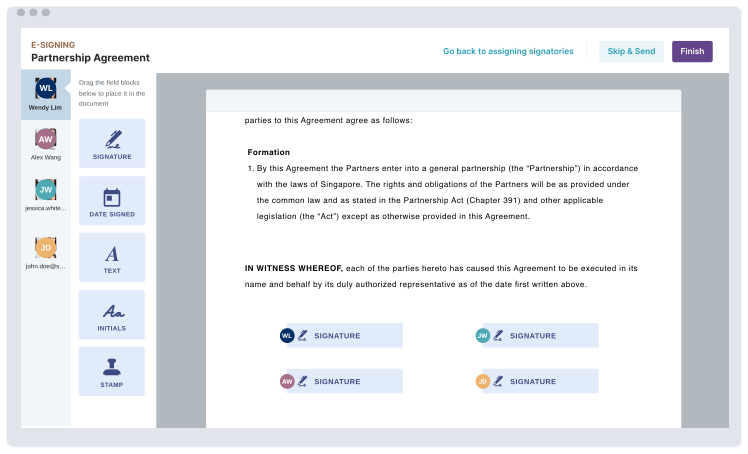
A form builder allows users to customize documents by adding designated fields for signatures and dates. Depending on the software, these fields may also accommodate initials, stamps, and seals to support different contract execution requirements.
2. Flexible Signing Workflows
Flexible signing workflows determine how agreements are distributed to signatories. Sequential signing routes a document to each person in a specified order, ensuring that required signatures are collected in sequence. Parallel signing makes the document available to all designated signatories at the same time, allowing them to sign independently.
3. Automated Notifications and Reminders
Automated notifications provide updates at different stages of the signing process. These include invitations to review and sign agreements, reminders about pending signatures, and notifications when other parties have completed signing.
4. Audit Trails
Audit trails provide a record of activities associated with a document's execution. They typically capture timestamps and details of key events, such as when an agreement was sent, opened, and signed. This creates a traceable record of the signing process that businesses can refer to when reviewing contract activity or resolving questions about execution.
Finalize Agreements on Schedule
Avoid delays caused by pending signatures. Receive automated notifications and send out reminders to keep signatories updated and encouraged to immediately complete their signing tasks.